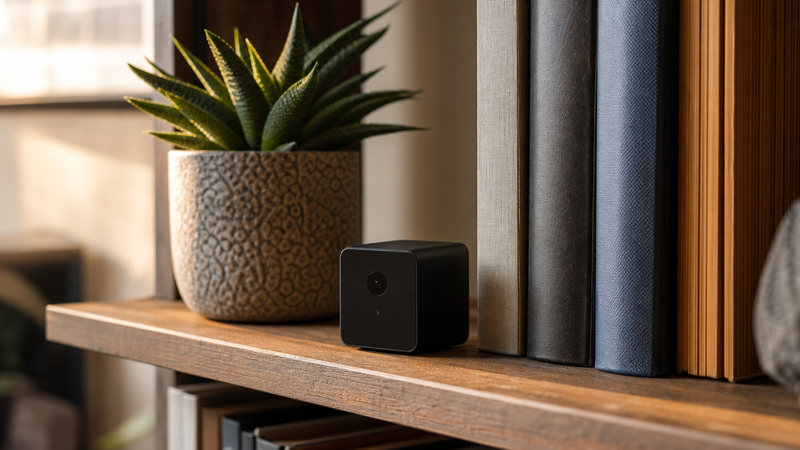
Yes, you can absolutely have a nanny cam without WiFi. Local-storage cameras record directly to a memory card — no internet connection, no router, no cloud account required. You get continuous footage stored right inside the device, completely off the grid from any network. It is one of the most overlooked options in home monitoring, and for a lot of situations, it is actually the smarter choice.
Most people assume a security camera is useless without an internet connection. That assumption is worth examining, because it is wrong — and the technology that makes it wrong is simpler, more reliable, and more private than most people realize. Here is what nobody at the big-box electronics store told you about how these cameras actually work.
How does a nanny cam work without WiFi?
A WiFi-free nanny cam operates on a straightforward principle: instead of streaming footage to a cloud server or your phone app, it writes video directly to a storage medium inside the device itself. That is usually a microSD card — a small chip no bigger than your thumbnail that can hold hours, sometimes days, of footage depending on its capacity and the camera’s recording settings.
When the camera detects motion, or on a continuous schedule, it records and saves. You retrieve the footage later by removing the SD card and reading it on a computer, or by connecting the camera to a device via USB. No passwords. No subscriptions. No streaming lag. The footage exists in one place, and that place is in your hands.
Some cameras in this category also support loop recording — meaning when the card fills up, it automatically overwrites the oldest footage first. You never have to manage storage manually, and you never miss a recording window because you forgot to clear the card. It is a clean, mechanical solution to a problem most people try to solve with software and subscriptions.
If you are considering a nanny cam for a bedroom, local storage is worth looking at seriously. Bedroom cameras that transmit over WiFi create a network signal that, in rare but real cases, can be intercepted. A camera that never touches a network cannot be accessed remotely by anyone — including people you did not invite.
What are the real advantages of a nanny cam that does not use WiFi?
The advantages go deeper than most buyers expect, and they cut against the conventional wisdom that “more connected” always means “better.”
The first advantage is privacy. A WiFi camera, by definition, sends your footage somewhere — to a server, to a cloud account, to an app on your phone. That chain of transmission has points of vulnerability. Passwords get compromised. Apps have security flaws. Servers get breached. A local-storage camera eliminates every single one of those risks because the footage never leaves the device until you physically retrieve it.
The second advantage is reliability. WiFi cameras are only as good as your internet connection. If the router goes down, if your ISP has an outage, if the camera drifts off the network — you lose your recording window. A local-storage camera does not care about any of that. It records in a dead zone. It records during a power outage if it has a battery. It records in a cabin in the mountains with no signal for twenty miles. It just records.
The third advantage is cost. No cloud storage subscription. No monthly fee. No tiered plan that locks your longer recordings behind a paywall. You buy the camera, you buy a microSD card, and you are done. For a lot of families — especially those monitoring a situation for a specific, finite period — that math is considerably better.
What are the limitations you should know before you buy?
Honesty is the whole point here. WiFi-free nanny cams are genuinely excellent for the right situations, and genuinely limited for others. You need to know both sides.
The biggest limitation is real-time access. If you are at work and you want to check in on what is happening at home right now, a local-storage camera cannot do that. The footage lives on the card, and you can only watch it after the fact. If remote live viewing matters to you, you need a WiFi-enabled camera — or you need a hybrid that offers both local storage and optional network access when you want it.
The second limitation is alerts. A WiFi camera can send you a push notification the moment it detects motion. A local-storage camera cannot reach your phone. If active, real-time notification is part of your safety plan, local storage alone will not get you there.
The third is storage management. Most cameras loop-record, which handles the overflow problem automatically. But if you need to preserve a specific incident, you have to act before the loop writes over it. Get into the habit of checking the card regularly — weekly at minimum if you are using it for ongoing monitoring.
None of these limitations are dealbreakers. They are just honest parameters. Knowing them upfront means you choose the right tool for your actual situation, not the one that was marketed most aggressively.
What types of nanny cams work best without WiFi?
The form factor matters more than most buyers consider. Local-storage cameras come in a surprising range of disguises, and the right one depends entirely on where you are placing it and what you need it to capture.
Clock cameras are among the most commonly used. They blend into a bedroom or living room without any visual indication that they are anything other than what they appear to be. They sit on a nightstand or a bookshelf, and nobody gives them a second look.
Smoke detector cameras cover a room from above, which gives you a wide-angle view that a ground-level device cannot match. They are particularly effective in common areas — living rooms, playrooms, entryways — where a broad field of view matters more than close-up detail.
Air purifier cameras, picture frame cameras, and charging block cameras are all in play, and each one suits a different environment. The consistent feature across the best options in this category is the same: a slot for a microSD card, a lens that captures at a reasonable resolution, and motion-activation to conserve storage space.
Resolution is worth paying attention to. 1080p is a reasonable floor for footage that is actually useful as documentation. Lower resolutions may save storage space, but if you ever need to show that footage to anyone — a building manager, a family member, law enforcement — you want faces and details to be legible. Do not trade image quality for card longevity on something this important.
Is a WiFi-free nanny cam legal to use in your home?
In most situations, yes — with one consistent rule. Recording video in a private home is generally legal when done by the homeowner or renter in spaces where a reasonable expectation of privacy does not exist. Living rooms, common areas, and spaces visible from an entryway are typically fine. Bathrooms and private bedrooms where the recorded person has a reasonable expectation of privacy are a different matter entirely, and the law is consistently protective of that distinction.
Audio is a separate question in many states. Some states require that all parties being recorded consent to audio capture — others follow a one-party rule. If your camera records audio, it is worth knowing which rule applies where you live. This is not legal advice — it is a prompt to do twenty minutes of research on your state’s recording laws before you set anything up.
The good news is that using a camera in your own home to monitor a caregiver working in a common area is, in most jurisdictions and for most practical purposes, well within your rights. Many families choose to disclose the camera to the caregiver as a matter of professional transparency. Others do not. That is a household decision, not a legal one, in most cases.
How do you set up a local-storage nanny cam correctly?
Setup is one of the places where these cameras genuinely shine. There is no app to configure, no router to pair with, no account to create. The typical process:
Insert a formatted microSD card — most cameras specify the card class and maximum capacity in the instructions, so match those specs. Position the camera so its lens covers the area you need. Most hidden cameras have a small indicator light you can disable so the camera does not draw attention to itself at night. Power it on, and verify it is recording by checking the card briefly before you rely on it.
Test the motion activation threshold if the camera has adjustable sensitivity. A camera set too sensitive will fill the card with footage of dust particles and shadows. One set too low may miss the moments that matter. Most cameras come with a middle-range default that works for typical indoor environments.
Check your footage once before you commit to the placement. Watch thirty seconds. Make sure the field of view covers what you intended, that the resolution is readable, and that the audio — if enabled — picks up the room clearly. Then close the housing, put it in place, and let it work.
Frequently Asked Questions About Nanny Cams Without WiFi
Can a nanny cam without WiFi still record motion-activated video?
Yes. Motion activation is a function of the camera’s onboard sensor, not its network connection. When movement is detected, the camera triggers recording and saves the clip to the SD card. This works identically whether or not the camera has any WiFi capability. Most local-storage cameras include adjustable sensitivity settings so you can tune the trigger to your environment.
How much footage can a WiFi-free nanny cam store?
That depends on the card size and the recording resolution. A 32GB microSD card at 1080p typically holds somewhere between 8 and 12 hours of continuous footage. At 720p, you get more. With motion-activated recording — where the camera only runs when it detects activity — a 32GB card can cover several days of typical household activity. Most cameras support cards up to 128GB or 256GB, which extends that window considerably.
Can someone hack a nanny cam that has no WiFi?
No. A camera that is not connected to any network has no remote access point. There is no IP address to target, no signal to intercept, no cloud account to breach. The only way to access the footage is to physically retrieve the SD card or connect the camera directly via USB. This is one of the strongest privacy arguments for choosing a local-storage camera, especially in sleeping areas.
Will a WiFi-free nanny cam work during a power outage?
It depends on the power source. A camera plugged into a wall outlet will stop recording when power goes out, just like any other corded device. Cameras with a built-in rechargeable battery will continue recording as long as the battery holds. If outage resilience matters to your situation, look specifically for battery-operated or battery-backup models when you shop.
How do I retrieve footage from a nanny cam without WiFi?
Remove the microSD card from the camera and insert it into a card reader connected to your computer, or use the USB connection on the camera itself if it supports direct playback. Footage is typically saved as standard MP4 files that open in any video player. No special software is required. This also makes it straightforward to preserve a specific clip by copying it from the card to your computer before the loop writes over it.
Do WiFi-free nanny cams have audio recording?
Many do, though not all. Check the product specifications before you buy if audio matters to your situation. Also check your state’s recording consent laws — some states require all-party consent for audio capture, and that applies regardless of whether the camera uses WiFi or local storage. Video-only cameras sidestep the audio question entirely if that is a concern.
Is a local-storage nanny cam a good option for renters?
Often, yes. Renters who cannot modify walls or run cables benefit from the simplicity of a self-contained, plug-in device that leaves no permanent footprint. There is no network to configure, no installation to reverse when you move out. You place it, you use it, and you take it with you. Just confirm your lease does not have language restricting surveillance devices — most do not, but it is worth a look.
What resolution should I look for in a WiFi-free nanny cam?
1080p is the practical minimum for footage that is actually useful. At 1080p, faces are legible at conversational distances, and details like clothing or objects are clear enough to be meaningful. Lower resolutions may extend storage life, but they reduce the value of the footage itself. If you ever need to use that recording for any serious purpose, you want it to actually show what happened. Spend slightly more and get the resolution right.
Here is the thing about technology: the newest option is not always the right one for your situation. WiFi cameras are genuinely useful tools. But the assumption that every camera needs a network connection — that you cannot have real monitoring without a cloud account and a monthly subscription — that assumption has a blind spot in it. Local-storage cameras fill that blind spot. They are simpler, more private, and for a lot of households, more reliable than anything streaming over a network.
If you are exploring your options for a bedroom nanny cam or any other room in your home, do not skip past the WiFi-free options because they look less sophisticated. Sometimes the quieter solution is the sharper one. And if you want to keep reading about how the right tools fit into a real safety plan — not a theoretical one — the post on non-lethal self-defense options for campus life is worth your time. The thinking is the same: know your environment, choose tools that actually fit it, and don’t let assumptions about what “everyone uses” steer you wrong.