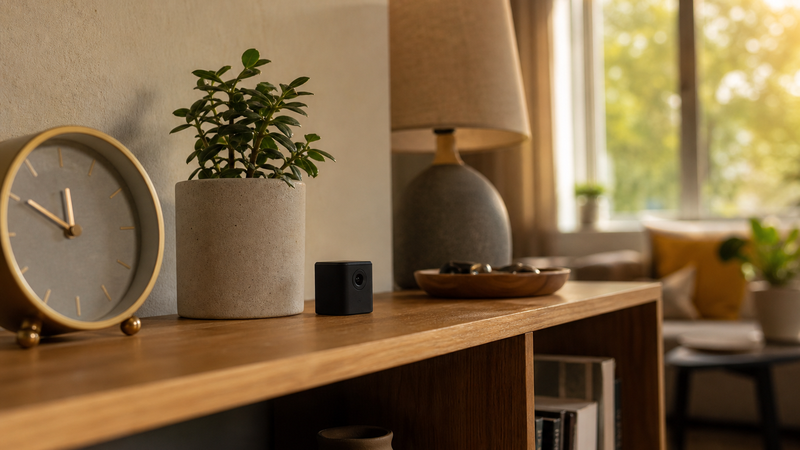
A wired hidden camera connects directly to a recording device or power source through a physical cable, giving you continuous, uninterrupted footage that never depends on a Wi-Fi signal. A wireless hidden camera transmits video over Wi-Fi or a local network, letting you place it almost anywhere and check footage remotely from your phone — but its reliability is tied to your internet connection and battery life. The right choice depends on where you’re placing it, what you need to record, and how your home or space is set up.
Now here’s the part most people don’t think about until they’re staring at a mounting hole in a wall they can’t patch: the question isn’t really “wired or wireless.” The question is, what problem are you actually trying to solve? Those are two different conversations, and getting clear on that before you buy saves you money, time, and the particular frustration of a camera that’s in the right place but working the wrong way.
Why does the difference between wired and wireless hidden cameras matter more than most buyers realize?
Most buyers walk into this decision thinking about price and picture quality. Those things matter, but they’re the second and third questions — not the first. The first question is continuity. How long does this camera need to record, and what happens if something interrupts it?
A wired camera, as long as it’s connected to power and a recording device, is essentially always on. It doesn’t drain a battery. It doesn’t drop off your network at 2 a.m. when your router decides to restart. It doesn’t need you to check an app to know it’s working. You plug it in, you aim it, and it runs. That consistency is the whole value proposition, and for certain situations — a fixed point in your home, a room that doesn’t change, a spot you’re watching long-term — it’s hard to beat.
A wireless camera trades that consistency for flexibility. You can put it somewhere without running a cable. You can move it. You can check the footage from across town. If you’re monitoring something temporary — a caregiver’s visits, a specific situation you want documented for a period of time, a front room while you’re traveling — wireless gives you options a wired setup simply can’t match. The tradeoff is real, though. Batteries need recharging. Wi-Fi signals have dead zones. And some wireless cameras stop recording when they lose their connection, which is exactly the moment you most need them to keep going.
What are the real-world situations where a wired hidden camera is the better choice?
Think of it this way: if the location is permanent, the threat is ongoing, and you need footage you can count on in court or with police, wired wins. Here’s why.
Wired cameras don’t have battery cycles to manage. In a situation where you’re documenting something over weeks or months — a neighbor who keeps coming onto your property, a door that keeps getting tampered with, a shared entryway in a building you don’t fully control — you don’t want to be the person who missed three days of footage because they forgot to charge a battery. A wired camera in that scenario is just steadily doing its job while you’re doing yours.
They’re also significantly harder to detect and defeat. A sophisticated person who suspects they’re being watched may look for camera shapes, blinking lights, or wireless signals. A wired camera, properly concealed, has no wireless signature to find. It is, in the most literal sense, invisible to anyone scanning for signals. For situations where you have real reason to believe someone in your space is not who they say they are — and you need solid, unbroken documentation — that matters.
The limitation is installation. Running cable through walls, hiding the wire, routing it to a DVR or monitor — that takes some effort. It’s not impossible, but it’s not a Saturday afternoon project for everyone. If that kind of setup feels out of reach, wireless is still a powerful tool. Just go in with clear eyes about what you’re trading.
What are the real-world situations where a wireless hidden camera is the better choice?
Wireless cameras changed the game for people who need monitoring without construction. No cable, no drill, no permanent commitment. If you’re renting, if you’re not handy, or if you need to move the camera regularly — wireless is the practical answer.
They’re also the right call when remote access matters. If you’re out of the house and you want to know what’s happening right now — not after you get home and pull up recorded footage — wireless cameras with app connectivity let you check in from wherever you are. For working parents, for people caring for an elderly parent at home, for anyone who travels and leaves someone else with access to their space, that real-time visibility is not a luxury. It’s the whole point.
If you’re thinking about a hidden camera for your front door, wireless is often the more practical setup — especially if your entryway doesn’t have an obvious place to run cable. You get a wide view of who’s coming and going, you can check the feed from your phone, and you’re not committed to a permanent installation. Battery life is the thing to watch. Look for cameras with motion-activated recording rather than continuous recording — they stretch the battery significantly because they’re only running when something is actually happening.
How does video quality compare between wired and wireless hidden cameras?
This is where the conversation gets genuinely interesting, because the honest answer is: it used to matter a lot more than it does now.
In the early days of wireless cameras, compression and transmission introduced real quality loss. You’d end up with pixelated, blocky footage that might show you a person-shaped blur but couldn’t help you identify anyone. That gap has narrowed considerably. Modern wireless cameras — even small, concealable ones — are capable of recording 1080p and higher. The technology caught up.
What still matters, though, is night performance and frame rate. A camera that records in beautiful 4K in daylight but drops to grainy, low-frame smearing in low light is not a camera you can rely on. If you need footage that can actually identify a face — which is often the whole point — check the low-light specs before anything else. We have a full breakdown of what hidden cameras have the best video quality for identifying faces, and low-light performance is the single biggest differentiator between cameras that look the same on a product page but perform very differently in the real world.
Wired cameras, connected to a DVR with local storage, still tend to have an edge in footage stability and retrieval. You’re not dependent on cloud storage subscriptions or upload speeds. The footage is on a hard drive in your home, it doesn’t compress for transmission, and you can pull it whenever you need it.
What should you know about storage and access before you choose either type?
Storage is the sleeper issue in this decision. People research cameras for hours and then realize after buying that they hadn’t thought through where the footage actually lives.
Wired systems typically connect to a DVR — digital video recorder — that stores footage locally on a hard drive. You own that footage. It doesn’t go anywhere. It’s not subject to a monthly subscription, it doesn’t get held behind a paywall, and it doesn’t disappear if a company changes its terms of service. For long-term documentation needs, local storage is a real advantage.
Most wireless cameras use one of two storage approaches: a micro SD card in the device itself, or cloud storage through the manufacturer’s app. SD card storage is local and private, but the cards have a capacity limit — when they fill up, they start overwriting old footage, so if you need to keep something, you have to pull it off the card before it’s gone. Cloud storage gives you more capacity and remote access, but it often comes with a monthly fee, and you’re trusting another company’s server with your footage.
Think about how long you need to keep footage and who has access to it. Those two questions will tell you which storage approach fits your life. And if you’re storing anything sensitive in the same space you’re monitoring — documents, valuables, anything that matters — consider pairing your camera setup with a hidden compartment safe for your home so your most important items stay secure regardless of what the camera captures.
Is a fake hidden camera ever worth considering alongside a real one?
This one surprises people. The assumption is that fake cameras are a budget compromise — something you buy when you can’t afford a real one. That’s not quite right.
A fake hidden camera deterrent works on a completely different principle than a real camera. A real camera documents what happens. A fake camera is designed to prevent something from happening at all. They’re not competing products — they’re solving different problems. And used together, strategically, they can cover more ground than either one alone.
The visible fake camera changes behavior at the entrance. The real hidden camera documents what actually happens inside. Someone casing your property sees the visible deterrent and reconsiders. Someone who makes it past that deterrent doesn’t know about the real camera — because it’s not visible. That layered approach is not a budget solution. It’s actually a more sophisticated setup than just running cameras everywhere.
Frequently Asked Questions About Wired and Wireless Hidden Cameras
Can a wireless hidden camera work without Wi-Fi?
Some wireless hidden cameras can record to a local SD card without any Wi-Fi connection at all. In that mode, you lose remote viewing and app notifications, but the camera still captures footage. If your location has poor or no internet access, look specifically for cameras with standalone SD recording as a feature — not all models support it, but many do.
How long does a wireless hidden camera battery last?
Battery life varies widely depending on camera size, resolution settings, and whether it records continuously or only on motion detection. Motion-activated wireless cameras typically last anywhere from a few days to a few weeks on a single charge. Continuous recording drains batteries much faster — sometimes within hours. If extended unattended recording is your goal, a wired setup or a camera with a large external battery pack will serve you better.
Will a wireless hidden camera work if someone jams the Wi-Fi signal?
This is a real vulnerability. A camera that depends entirely on Wi-Fi to record and transmit footage can be disrupted if someone uses a jamming device on your network. Cameras that record locally to an SD card, regardless of network status, are more resistant to this kind of interference. For situations involving sophisticated threats, local recording — either via SD card or a wired DVR — provides a layer of protection Wi-Fi-only cameras cannot.
What’s the difference between a hidden camera and a security camera?
A security camera is visible by design — its presence is part of its deterrent value. A hidden camera is designed to blend into the environment and not be noticed. Both record footage, but they serve different purposes. Hidden cameras are used when you need documentation without alerting the person being recorded — monitoring a caregiver, documenting a domestic situation, or recording entry points without revealing their location.
Do I need to tell people there’s a hidden camera in my home?
Laws on recording vary by state and situation. In your own private home, recording in common areas is generally permitted in most states, but recording in areas where people have a reasonable expectation of privacy — like a bathroom or bedroom — is typically illegal regardless of your ownership of the property. If you’re recording employees, caregivers, or guests, check your state’s specific laws. This post is not legal advice — a few minutes with your state’s recording consent laws will give you clarity specific to your situation.
Can a hidden camera footage be used as legal evidence?
Hidden camera footage can and does hold up in court and in police investigations, provided it was obtained legally. Courts have accepted this kind of footage in cases involving theft, elder abuse, and domestic incidents. The key is that the recording must comply with your state’s laws on consent and location. Footage from a camera placed in violation of those laws may be inadmissible and could create legal problems for you rather than the person you’re documenting.
What is the best placement for a hidden camera in a home?
The most effective placement depends on what you’re monitoring. Entry points — front doors, back doors, and windows — give you the widest view of who comes and goes. Common areas like living rooms and hallways capture the most activity. The key principle is height and angle: position the camera high enough to capture the full body and face of anyone entering the room, at an angle that doesn’t create blind spots behind furniture or doors.
How is a hidden camera different from a nanny cam?
The terms are often used interchangeably, but “nanny cam” specifically refers to a camera placed to monitor a caregiver or babysitter in your home. It is typically a hidden camera disguised as an everyday household object. The underlying technology is the same — the distinction is context and intent. Any well-placed hidden camera can serve this function, but some products are specifically designed and marketed for caregiver monitoring with features like facial clarity and motion alerts built in.
The technology behind these cameras — wired or wireless — is smarter than it’s ever been. But the smartest piece of this whole setup is the decision you make before you ever plug anything in. Know what you’re watching for. Know how long you need to watch it. Know whether you need footage you can hand to law enforcement or footage you need to see right now from across the city. Those three questions will tell you exactly which direction to go — and they’ll make sure the camera you buy is actually doing the job you bought it for.
Take a look at what’s available for your specific situation, and if you’re not sure where to start, the related guides on this site — including the full breakdown on video quality for identifying faces — will help you get there. You deserve a setup that works. Not one that almost works.